A calmer way to work with SQL.
A fast, distraction-free desktop SQL client for PostgreSQL, MySQL, MariaDB, SQL Server, SQLite, and DuckDB. Runs completely locally with direct sockets, OS credential vault security, and zero cloud requirement.
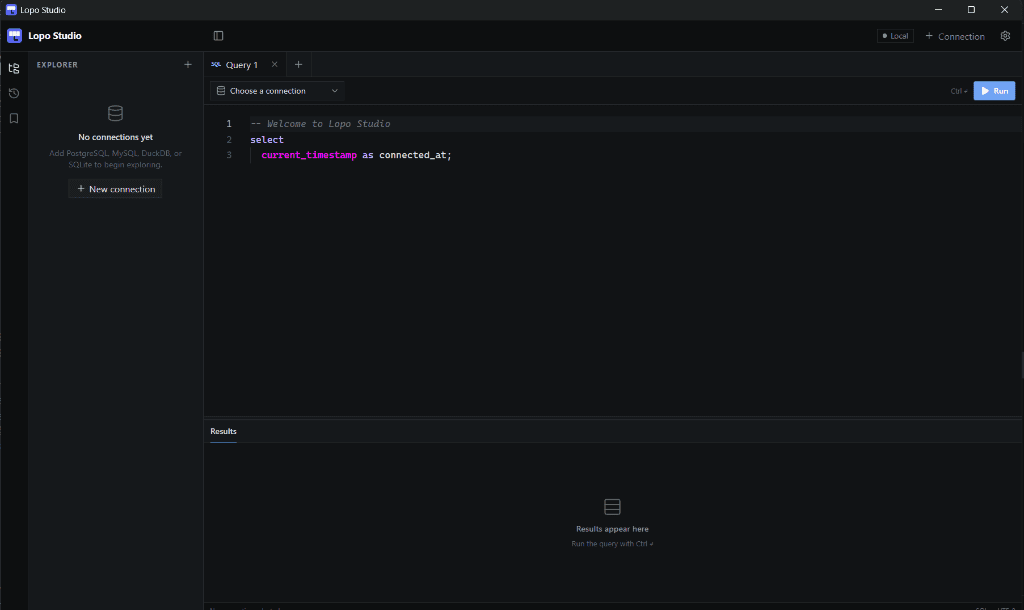
Queries execute straight over local loopback sockets or standard TCP without middleman services.
Database passwords and SSH key passphrases are stored in Windows Credential Manager.
Responsive keyword autocomplete, multi-tab workspace, and clear result table viewing.
Built-in support for PostgreSQL, MySQL, MariaDB, SQL Server, SQLite files, and embedded DuckDB.
Your data stays on your machine.
Lopo Studio is a desktop SQL client built for focused, local work. It does not require an account, a cloud workspace, or a constant internet connection to use your databases.
- •No account required — connect directly to PostgreSQL, MySQL, MariaDB, SQL Server, SQLite, and DuckDB.
- •Your credentials stay local — database passwords and SSH key passphrases are stored in Windows Credential Manager.
- •No telemetry by default — Lopo Studio does not send your queries or database contents to our servers.
PostgreSQL, MySQL, MariaDB, SQL Server, SQLite, and DuckDB.
Connect to local servers, containerized instances, or embedded file databases without proprietary connectors or cloud middleware.
PostgreSQL
Introspection of schemas, types, JSONB fields, triggers, and indices with low-latency direct execution.
MySQL
Fast multi-query execution, session parameter inspection, and direct connection support.
MariaDB
Connect directly to MariaDB servers with schema browsing, safe table editing, and dialect-aware query tools.
SQL Server
Work with Microsoft SQL Server over TCP or connect to a local Windows LocalDB instance with integrated authentication.
SQLite
Instant database creation and query execution on local .db, .sqlite, or .sqlite3 files.
DuckDB
Embedded columnar SQL engine for analytical queries on local DuckDB database files and imported tables.
Everything needed for everyday SQL work.
Ergonomic tools for writing queries, exploring table structures, importing data, and connecting securely.
Direct Local Connections
Connections run directly from your Windows desktop to your database. No cloud accounts, no remote relays, no tracking.
Focused SQL Workspace
Use multiple query tabs, SQL completion, syntax highlighting, full-script execution, and an explicit selected-SQL action when you need it.
Data Browser & Safe Editing
Browse paginated tables, filter and sort rows, inspect structure, and make deliberate in-place edits backed by safe row identity checks.
CSV Import That Sets You Up
Import local CSVs into every supported engine with type detection, table creation, and an optional primary key chosen before the data lands.
Data, Schema & SQL Exports
Export visible query results as CSV or JSON, generate table DDL, and save portable schema snapshots for review or version control.
Search Data & Map Relationships
Find a value across a schema, open matching rows, and view foreign-key relationships without having to memorize table names first.
Local Backups & Restore
Schedule SQLite and DuckDB snapshots, create portable PostgreSQL, MySQL, or MariaDB SQL backups, and save a safety copy before restoring.
Git-Aware SQL Workflow
Choose a repository, review changed files and diffs, stage selected work, and create local commits without leaving your database workspace.
Saved Queries & Query History
Keep reusable SQL close at hand and revisit past executions with timestamps and row counts—without storing connection passwords.
Read-Only Profiles & Local Security
Protect sensitive connections with read-only mode while database passwords and SSH passphrases stay in Windows Credential Manager.
SSH Tunnel Support (Experimental)
Connect to remote databases behind bastion hosts using local port forwarding with password or private key authentication.
Everything you need. Less of what you don’t.
Large database tools can be powerful, but they can also feel crowded when all you want is to connect, query, browse, edit, and export. Lopo Studio keeps the everyday SQL workflow clear, fast, and local.
Lopo Studio
- •PostgreSQL, MySQL, MariaDB, SQL Server, SQLite, and DuckDB
- •Local-first workspace with no account required
- •SQL workspace with completion, saved queries, history, and explicit full-script or selected-SQL execution
- •Browse and safely edit table data
- •CSV import with type detection and optional primary keys, plus CSV/JSON result exports
- •Global data search, schema relationship maps, and Git-ready schema snapshots
- •Scheduled local snapshots, portable server SQL backups, and safety copies before restore
- •Git status, diffs, staging, and local commits without leaving Lopo
- •Read-only connection profiles and credentials stored in your operating system’s secure vault
Large database suites
- •Broader database, cloud, and enterprise administration support
- •Advanced schema migration, modeling, and team-management tools
- •More configuration and a steeper learning curve
- •Better suited to specialized enterprise workflows
Founder License — $69 $49 USD
FOUNDERto save $20One payment. Lifetime access and product updates. Includes full Lopo Studio desktop client access, all future updates, and engine optimizations with zero recurring subscription fees.
Fair Licensing FAQ
Why is Lopo Studio closed source?
Lopo Studio is closed source so we can sustainably maintain the desktop app, fund ongoing development, and offer a straightforward one-time license instead of requiring a subscription. We still build it local-first: your database connections, queries, and workspace data remain on your machine. Lopo Studio does not require a cloud account to use your databases.
Can I get a refund?
Yes. If Lopo Studio is not right for you, contact support within 14 days of purchase for a refund. A refunded license is no longer eligible for future activations, updates, or support.
Does Lopo Studio require a subscription?
No. The Founder License is a one-time purchase. One payment gives you lifetime access and all future product updates with zero subscription or renewal fees.
Download Lopo Studio
Windows 10 & 11 (64-bit) • Direct installer or Microsoft Store (v1.0.3)